Azure Functions Tools
什麼是 Azure Functions Core Tools? Azure Functions Core Tools 是一組命令列工具,可讓您用來在本機電腦上開發和測試 Azure Functions。 Core Tools 具有各種與函數相關的功能,但其主要用途是:
- 生成在本地計算機上開發函數所需的文件和文件夾。
- 在本地運行函數以便對其進行測試和調試。
- 將函數發佈到 Azure。
Core Tools 會封裝成名為 func 的單一命令列公用程式。如果從命令行運行 func 而沒有使用任何其他命令,它將顯示版本信息和使用指南。現在您不需要加以閱讀,但其內容如下所示:
C:\Users\1905028\AppData\Local\AzureFunctionsTools\Releases\3.47.0\cli_x64\func.exe

Azure Functions Core Tools
Core Tools Version:       3.0.4899 Commit hash: N/A  (64-bit)
Function Runtime Version: 3.17.0.0

Usage: func [context] [context] <action> [-/--options]

Contexts:
azure       Commands to log in to Azure and manage resources
durable     Commands for working with Durable Functions
extensions  Commands for installing extensions
function    Commands for creating and running functions locally
host        Commands for running the Functions host locally
kubernetes  Commands for working with Kubernetes and Azure Functions
settings    Commands for managing environment settings for the local Functions host
templates   Commands for listing available function templates

Actions:
start   Launches the functions runtime host
    --port [-p]             Local port to listen on. Default: 7071
    --cors                  A comma separated list of CORS origins with no spaces. Example: https://functions.azure.com,https://functions-staging.azure.com
    --cors-credentials      Allow cross-origin authenticated requests (i.e. cookies and the Authentication header)
    --timeout [-t]          Timeout for the functions host to start in seconds. Default: 20 seconds.
    --useHttps              Bind to https://localhost:{port} rather than http://localhost:{port}. By default it creates and trusts a certificate.
    --cert                  for use with --useHttps. The path to a pfx file that contains a private key
    --password              to use with --cert. Either the password, or a file that contains the password for the pfx file
    --language-worker       Arguments to configure the language worker.
    --no-build              Do no build current project before running. For dotnet projects only. Default is set to false.
    --enableAuth            Enable full authentication handling pipeline.
    --functions             A space seperated list of functions to load.
    --verbose               When false, hides system logs other than warnings and errors.
    --dotnet-isolated-debug When specified, set to true, pauses the .NET Worker process until a debugger is attached.
    --enable-json-output    Signals to Core Tools and other components that JSON line output console logs, when applicable, should be emitted.
    --json-output-file      If provided, a path to the file that will be used to write the output when using --enable-json-output.

new     Create a new function from a template. Aliases: new, create
    --language [-l]  Template programming language, such as C#, F#, JavaScript, etc.
    --template [-t]  Template name
    --name [-n]      Function name
    --authlevel [-a] Authorization level is applicable to templates that use Http trigger, Allowed values: [function, anonymous, admin]. Authorization level
                     is not enforced when running functions from core tools
    --csx            use old style csx dotnet functions

init    Create a new Function App in the current folder. Initializes git repo.
    --source-control       Run git init. Default is false.
    --worker-runtime       Runtime framework for the functions. Options are: dotnet, dotnetIsolated, node, python, powershell, custom
    --force                Force initializing
    --docker               Create a Dockerfile based on the selected worker runtime
    --docker-only          Adds a Dockerfile to an existing function app project. Will prompt for worker-runtime if not specified or set in local.settings.js
                           on
    --csx                  use csx dotnet functions
    --language             Initialize a language specific project. Currently supported when --worker-runtime set to node. Options are - "typescript" and "jav
                           ascript"
    --managed-dependencies Installs managed dependencies. Currently, only the PowerShell worker runtime supports this functionality.
    --no-docs              Do not create getting started documentation file. Currently supported when --worker-runtime set to python.

pack    Pack function app into a zip that's ready to run.
    --output [-o]         output path for the packed archive
    --build-native-deps   Build python packages in a container image
    --no-bundler          Skips generating a bundle when publishing python function apps with build-native-deps.
    --additional-packages List of packages to install when building native dependencies. For example: "python3-dev libevent-dev"

logs    Gets logs of Functions running on custom backends
    --platform Hosting platform for the function app. Valid options: kubernetes
    --name     Function name
Core Tools 是獨立的公用程式,而不是大型整合式開發環境或工具的延伸模組。你可以通過命令行和 Core Tools 來完成上述任務。使用你喜歡的任何文本編輯器編寫代碼並修改配置。 在實踐中,還需要 Azure CLI 或 Azure PowerShell 才能登錄到 Azure 並執行其他管理任務
MacOS
install azure functions tool
brew tap azure/functions
brew install azure-functions-core-tools@4
brew link --overwrite azure-functions-core-tools@4
Install az cli
brew update && brew install azure-cli
建立專案 (func init)
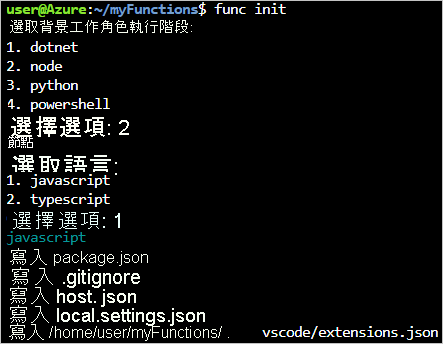
func init
func init 會詢問您要將哪個語言執行階段用於應用程式,並適當地自訂專案資料夾的內容。
在建立新的函式專案時,專案資料夾中包含的檔案將取決於您選取的語言執行階段
有兩個最重要的專案檔:
host.json會儲存函式應用程式的執行階段設定值,例如記錄選項。在本機執行函式時和在 Azure 之中,都會使用儲存在此檔案中的設定。local.settings.json存儲僅適用於使用 Core Tools 在本地運行的函數應用的配置值。此文件包含兩種類型的設置:- 本地運行時設置:用於配置本地函數運行時本身。
- 自定義應用程序設置:根據應用的需求添加和配置這些設置。應用的所有函數都可以訪問和使用這些設置。
建立新的函式 (func new)
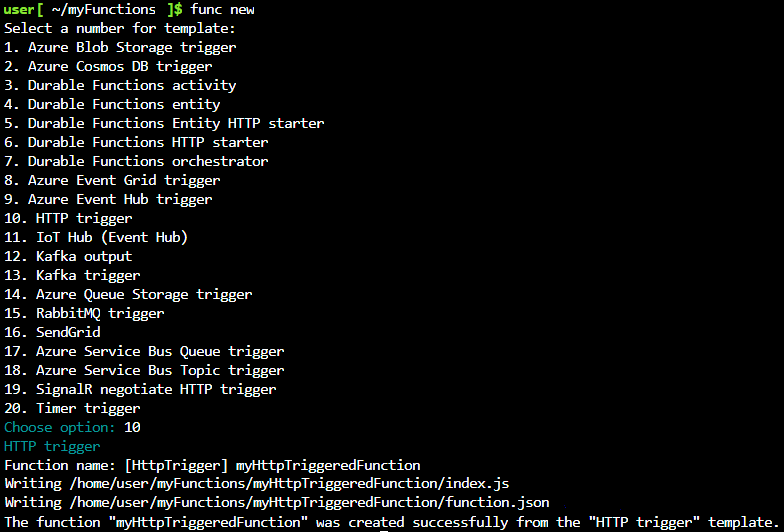
func new
了解自己要使用的函式觸發程序類型,以及要為函式提供的名稱之後,func new 將會以您的函式專案所選擇的語言,產生完整且可供發佈的起始實作。起始代碼說明瞭如何使用所選的觸發器類型,
並且可以幫助你快速入門:只需將函數主體替換為自己的實現,即可開始生成、運行、測試和發布。
在本機執行函式 (func start)
發佈至 Azure func azure functionapp publish)
func azure functionapp publish <app_name>
func azure functionapp publish kimi-functions-demo