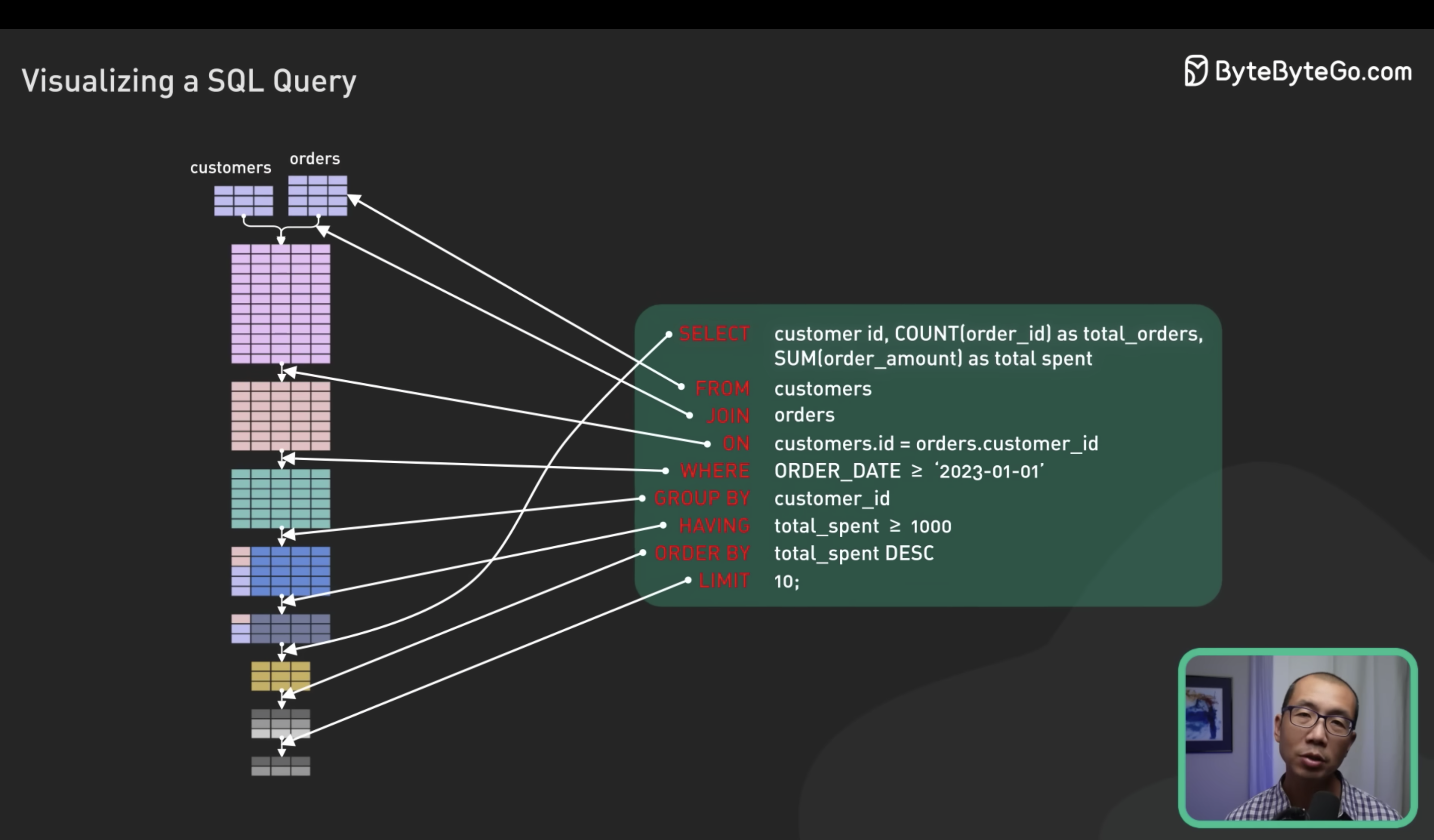
Secret_To_Optimizing_SQL_Queries_Understand_The_SQL_Execution_Order
Source from : ByteByteGo https://www.youtube.com/watch?v=BHwzDmr6d7s
SELECT customer_id, COUNT(order_id) as total_orders, SUM(order_amount) as total_spent
FROM customers
JOIN orders
ON customers.id = order.customer_id
WHERE ORDER_DATE >= '2023-01-01'
GROUP BY customer_id
HAVING total_spent >= 1000
ORDER BY total_spent DESC
LIMIT 10;
SARGABL ( Search ARGument ABLE )
意味著查詢可以有效使用索引進行搜索。 SARGABLE 的查詢條件可以充分利用索引的特性,以提高查詢性能。
SARGABLE 查詢通常具有以下特徵:
- 對索引列進行直接比較,而不是進行函數操作或運算。
- 使用常量或可預測的表達式進行比較,而不是使用不可預測或非確定性的表達式。
- 避免對索引列進行類型轉換。
- Avoid using functions or calculations on indexed columns in the WHERE clause
- Use direct comparisons when possible, instead of wrapping the column in a function
- If we need to use a function on a column, consider creating a computed column or a function-base index, if the database system supports it.
與 SARGABLE 相反的是 NON-SARGABLE,即不適合索引搜索的查詢。 NON-SARGABLE 的查詢可能需要對索引列進行函數操作、運算或類型轉換,從而無法有效利用索引,導致較慢的查詢性能。
Bad: SELECT ... WHERE Year(myDate) = 2008
Fixed: SELECT ... WHERE myDate >= '01-01-2008' AND myDate < '01-01-2009'

Bad: SELECT ... WHERE SUBSTRING(DealerName,4)='Ford'
Fixed: SELECT ... WHERE DealerName Like 'Ford%'

Bad: SELECT ... WHERE DateDiff(mm, OrderDate,GetDate()) >= 30
Fixed: SELECT ... WHERE OrderDate < DateAdd(mm, -30, GetDate())
優化建議
這是一個查詢顧客訂單數量和總金額的SQL語句,並選擇總金額大於等於1000的前10個顧客。以下是針對這個查詢的一些優化建議:
- 確保資料表上的關聯鍵索引已經建立:確保customers表的id和orders表的customer_id上都有索引。這樣可以加速連接操作的執行。
- 確保日期欄位有索引:確保orders表的ORDER_DATE欄位上有索引。這樣可以加速日期條件的篩選。
- 避免在WHERE子句中對日期欄位進行函數操作:將日期條件改為ORDER_DATE >= DATE '2023-01-01',避免對ORDER_DATE進行函數操作,以便使用索引加速查詢。對日期欄位進行比較,而不使用函數操作,可以更有效地使用索引,從而提高查詢效能
- 只選擇需要的欄位:如果只需要customer_id、total_orders和total_spent這三個欄位,可以只選擇這三個欄位,避免不必要的資料傳輸和處理。
- 適時重新統計資料庫統計資訊:確保資料庫的統計資訊是最新的,以幫助查詢優化器選擇最佳的執行計劃。
- 考慮資料庫分區:如果資料量非常大,可以考慮對orders表根據日期進行分區,這樣可以提升查詢效能。
分區
例按年份和月份將 orders 表分為多個分區
ALTER TABLE orders
PARTITION BY RANGE (YEAR(order_date) * 100 + MONTH(order_date)) (
  PARTITION p1 VALUES LESS THAN (202301),
  PARTITION p2 VALUES LESS THAN (202302),
  PARTITION p3 VALUES LESS THAN (202303),
  ...
);
CREATE TABLE orders (
  order_id INT,
  customer_id INT,
  order_date DATE,
  order_amount DECIMAL(10, 2)
)
PARTITION BY RANGE (YEAR(order_date) * 100 + MONTH(order_date)) (
  PARTITION p1 VALUES LESS THAN (202301),
  PARTITION p2 VALUES LESS THAN (202302),
  PARTITION p3 VALUES LESS THAN (202303),
  ...
);
加載數據:將現有的數據加載到分區表中,可以使用 INSERT INTO 陳述式將數據插入到特定分區中。以下是一個示例:
INSERT INTO orders PARTITION (p1)
SELECT order_id, customer_id, order_date, order_amount
FROM existing_orders
WHERE order_date >= '2023-01-01' AND order_date < '2023-02-01';
查詢分區表:在使用分區表時,可以根據分區鍵(在這種情況下是日期)進行查詢。以下是一個示例:
SELECT customer_id, COUNT(order_id) AS total_orders, SUM(order_amount) AS total_spent
FROM orders PARTITION (p1, p2, p3)  -- 只查詢特定分區
WHERE order_date >= '2023-01-01'
GROUP BY customer_id
HAVING total_spent >= 1000
ORDER BY total_spent DESC
LIMIT 10;
只查詢 p1、p2 和 p3 分區,並且使用了分區表的優勢進行快速查詢。
優化語法
- 使用表的別名:對於 customers 表和 orders 表,可以使用別名來簡化查詢語句,例如 c 和 o。
- 使用內連接(INNER JOIN):將 JOIN 關鍵字替換為 INNER JOIN,這是默認的連接類型。
- 將 WHERE 條件移到 JOIN 條件中:將 ORDER_DATE >= '2023-01-01' 的條件從 WHERE 子句移動到 JOIN 條件中,這有助於優化查詢計劃 (小表驅動大表)。
- 使用字首別名:對於 COUNT 和 SUM 的計算結果,可以使用 AS 關鍵字和字首別名,例如 COUNT(o.order_id) AS total_orders 和 SUM(o.order_amount) AS total_spent。
- 使用 TOP 關鍵字代替 LIMIT:如果您使用的是 Microsoft SQL Server,可以將 LIMIT 10 替換為 TOP 10。
SELECT c.customer_id, COUNT(o.order_id) AS total_orders, SUM(o.order_amount) AS total_spent
FROM customers AS c
INNER JOIN orders AS o ON c.id = o.customer_id AND o.ORDER_DATE >= DATE '2023-01-01'
GROUP BY c.customer_id
HAVING total_spent >= 1000
ORDER BY total_spent DESC
LIMIT 10;