Golang Package Sync
Share Memory By Communicating
傳統的線程模型(通常在編寫 Java、C++ 和Python 程序時使用)程序員在線程之間通信需要使用共享內存。
通常,共享數據結構由鎖保護,線程將爭用這些鎖來訪問數據。
在某些情況下,通過使用線程安全的數據結構(如Python的Queue, JAVA的 HashTable),這會變得更容易。
Go 的並發原語 goroutines 和 channels 為構造並發軟件提供了一種優雅而獨特的方法。
Go 沒有顯式地使用鎖來協調對共享數據的訪問,而是鼓勵使用 chan 在 goroutine 之間傳遞對數據的引用。
這種方法確保在給定的時間只有一個goroutine 可以訪問數據。
Do not communicate by sharing memory; instead, share memory by communicating.
Detecting Race Conditions with Go
data race 是兩個或多個 goroutine 訪問同一個資源(如變量或數據結構),
並嘗試對該資源進行讀寫而不考慮其他 goroutine。
這種類型的代碼可以創建您見過的最瘋狂和最隨機的 bug。
通常需要大量的日誌記錄和運氣才能找到這些類型的bug。
早在6月份的Go 1.1中,Go 工具引入了一個 race detector。race detector是在構建過程中內置到程序中的代碼。
然後,一旦你的程序運行,它就能夠檢測並報告它發現的任何競爭條件。
它非常酷,並且在識別罪魁禍首的代碼方面做了令人難以置信的工作。
$ go test -race mypkg    // test the package
$ go run -race mysrc.go  // compile and run the program
$ go build -race mycmd   // build the command
$ go install -race mypkg // install the package
Example
example 1 :
package main

import (
    "fmt"
    "sync"
    "time"
)

var (
    Wg      sync.WaitGroup
    Counter int = 0
)

func main() {
    for routine := 1; routine <= 2; routine++ {
        Wg.Add(1)
        go Routine(routine)
    }
    Wg.Wait()
    fmt.Printf("Final Counter : %d\n", Counter)
}

func Routine(id int) {
    defer Wg.Done()
    for count := 0; count < 2; count++ {
        value := Counter
        time.Sleep(1 * time.Nanosecond)
        value++
        Counter = value
    }
}
go run -race  Golang/Package_Sync/examples/raceConditions.go
==================
WARNING: DATA RACE
Write at 0x000001216a90 by goroutine 8:
  main.Routine()
      /Users/kimi/go/src/xxx/Golang/Package_Sync/examples/raceConditions.go:29 +0xa6
  main.main.func1()
      /Users/kimi/go/src/xxx/Golang/Package_Sync/examples/raceConditions.go:17 +0x39

Previous read at 0x000001216a90 by goroutine 7:
  main.Routine()
      /Users/kimi/go/src/xxx/Golang/Package_Sync/examples/raceConditions.go:26 +0x84
  main.main.func1()
      /Users/kimi/go/src/xxx/Golang/Package_Sync/examples/raceConditions.go:17 +0x39

Goroutine 8 (running) created at:
  main.main()
      /Users/kimi/go/src/xxx/Golang/Package_Sync/examples/raceConditions.go:17 +0x88

Goroutine 7 (running) created at:
  main.main()
      /Users/kimi/go/src/xxx/Golang/Package_Sync/examples/raceConditions.go:17 +0x88
==================
Final Counter : 2
Found 1 data race(s)
exit status 66
example 2 :
如果 struct 的佈局不一樣 就會報錯了
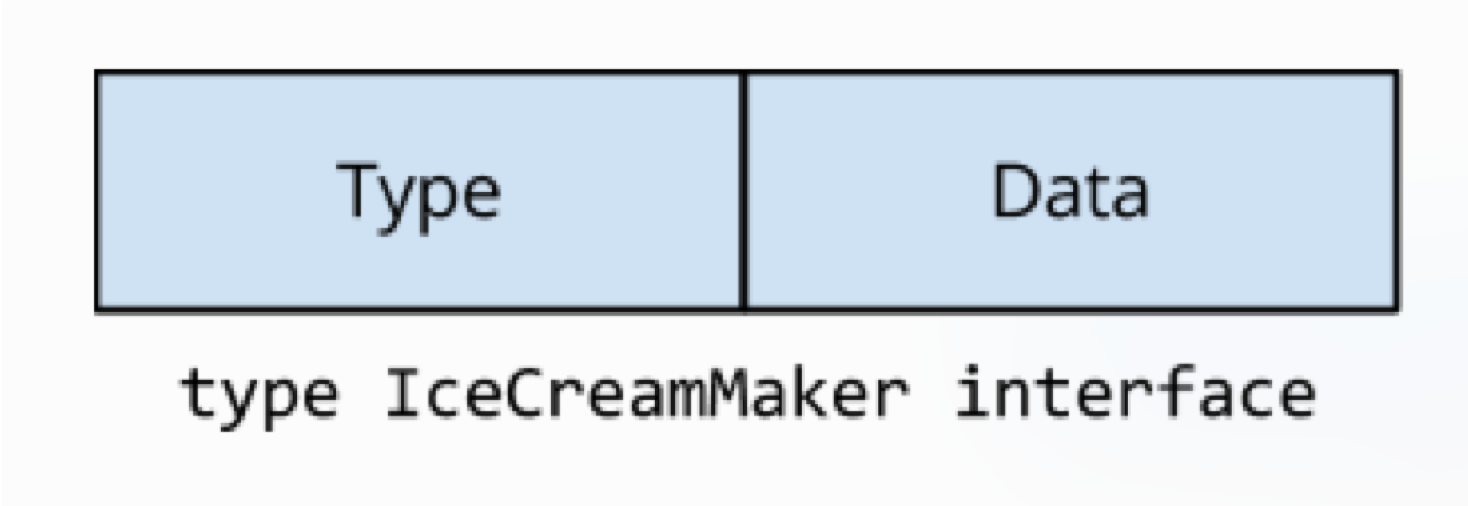
package main

import (
    "fmt"
)

type IceCreamMaker interface {
    Hello()
}

type Kimi struct {
    id   int
    name string
}

func (k *Kimi) Hello() {
    fmt.Printf("Kimi says, \"Hello my name is %s \"\n", k.name)
}

type Yellow struct {
    name string
}

func (j *Yellow) Hello() {
    fmt.Printf("Yellow says, \"Hello my name is %s \"\n", j.name)
}

func main() {
    var kimi = &Kimi{id: 3, name: "Kimi"}
    // var kimi = &Kimi{name: "Kimi"}
    var yellow = &Yellow{name: "Yellow"}
    var maker IceCreamMaker = kimi
    var loop0, loop1 func()

    loop0 = func() {
        maker = kimi
        go loop1()
    }

    loop1 = func() {
        maker = yellow
        go loop0()
    }

    go loop0()

    for {
        maker.Hello()
    }
}
sync.atomic vs sync.mutex
Mutex vs Atomic 的情況裡,Mutex 相對更重。 因為涉及到更多的 goroutine 之間的上下文切換 pack blocking goroutine,以及喚醒 goroutine。
寫多讀少 -> 互斥鎖 讀多寫少 -> 原子操作, 讀寫鎖
main.go
package main

import (
    "fmt"
    "log"
    "net/http"
    _ "net/http/pprof"
    "sync"
    "sync/atomic"
)

type Config struct {
    a []int
}

func (c *Config) T() {}

func Wrong(numbers int) {
    cfg := &Config{}
    go func() {
        i := 0
        for {
            i++
            cfg.a = []int{i, i + 1, i + 2, i + 3, i + 4, i + 5}
        }
    }()

    var wg sync.WaitGroup
    for n := 0; n < 4; n++ {
        wg.Add(1)
        go func() {
            defer wg.Done()
            for n := 0; n < numbers; n++ {
                fmt.Printf("%v\n", cfg)
            }
        }()
    }
    wg.Wait()
}

func Atomic(numbers int) {
    var v atomic.Value
    v.Store(&Config{})

    go func() {
        i := 0
        for {
            i++
            cfg := &Config{a: []int{i, i + 1, i + 2, i + 3, i + 4, i + 5}}
            v.Store(cfg)
        }
    }()

    var wg sync.WaitGroup
    for n := 0; n < 4; n++ {
        wg.Add(1)
        go func() {
            defer wg.Done()
            for n := 0; n < numbers; n++ {
                cfg := v.Load().(*Config)
                cfg.T()
                // fmt.Printf("%v\n", cfg)
            }
        }()
    }
    wg.Wait()
}

func RWMutex(numbers int) {
    var rwmu sync.RWMutex
    var cfg *Config

    go func() {
        i := 0
        for {
            i++
            rwmu.Lock()
            cfg = &Config{a: []int{i, i + 1, i + 2, i + 3, i + 4, i + 5}}
            rwmu.Unlock()
        }
    }()

    var wg sync.WaitGroup
    for n := 0; n < 4; n++ {
        wg.Add(1)
        go func() {
            defer wg.Done()
            for n := 0; n < numbers; n++ {
                rwmu.RLock()
                cfg.T()
                // fmt.Printf("%v\n", cfg)
                rwmu.RUnlock()
            }
        }()
    }
    wg.Wait()
}

func Channel(numbers int) {
    dataCh := make(chan *Config)
    var cfg *Config

    go func() {
        i := 0
        for {
            i++
            dataCh <- &Config{a: []int{i, i + 1, i + 2, i + 3, i + 4, i + 5}}
        }
    }()

    var wg sync.WaitGroup
    for n := 0; n < 4; n++ {
        wg.Add(1)
        go func() {
            defer wg.Done()
            for n := 0; n < numbers; n++ {
                cfg = <-dataCh
                cfg.T()
                // fmt.Printf("%v\n", cfg)
            }
        }()
    }
    wg.Wait()
}

func main() {
    // Wrong()
    // Atomic(100)
    // RWMutex(100)
    Channel(100)
    log.Fatalln(http.ListenAndServe("localhost:9999", nil))
}
main_test.go
func BenchmarkAtomic(b *testing.B) {
    b.ResetTimer()
    Atomic(b.N)
    // for i := 0; i < b.N; i++ {
    //     Atomic(i)
    // }
}

func BenchmarkRWMutex(b *testing.B) {
    b.ResetTimer()
    RWMutex(b.N)
    // for i := 0; i < b.N; i++ {
    //    RWMutex(i)
    // }
}

func BenchmarkChannel(b *testing.B) {
    b.ResetTimer()
    Channel(b.N)
}
goos: darwin
goarch: amd64
pkg: MyGoNote/Golang/Package_Sync/examples/atomic_mutex
cpu: Intel(R) Core(TM) i5-8259U CPU @ 2.30GHz
BenchmarkAtomic-8       236242672                6.315 ns/op           0 B/op          0 allocs/op
BenchmarkRWMutex-8        305217              3722 ns/op            2374 B/op         65 allocs/op
BenchmarkChannel-8         50260             23856 ns/op            9870 B/op        274 allocs/op
PASS
ok      MyGoNote/Golang/Package_Sync/examples/atomic_mutex      7.040s
sync.atoml
Copy-On-Write(COW) 思路在微服務降級或者 local cache 場景中經常使用。 寫時複製(Copy-On-Write)指的是,寫操作時候複製全量老數據到一個新的對象中, 攜帶上本次新寫的數據,之後利用原子替換(atomic.Value), 更新調用者的變量。來完成無鎖訪問共享數據。
寫入時複製(英語:Copy-on-write,簡稱COW)是一種電腦程式設計領域的最佳化策略。其核心思想是, 如果有多個呼叫者(callers)同時請求相同資源(如記憶體或磁碟上的資料儲存),他們會共同取得相同的指標指向相同的資源, 直到某個呼叫者試圖修改資源的內容時,系統才會真正複製一份專用副本(private copy)給該呼叫者, 而其他呼叫者所見到的最初的資源仍然保持不變。這過程對其他的呼叫者都是透明的。 此作法主要的優點是如果呼叫者沒有修改該資源,就不會有副本(private copy)被建立,因此多個呼叫者只是讀取操作時可以共享同一份資源。
sync.Mutex
互斥鎖飢餓問題
https://github.com/golang/go/issues/13086 例子: https://gist.github.com/blanchonvincent/5d003844134b81f1fdf525457fc97191#file-starvation-go
package main

import (
    "fmt"
    "sync"
    "sync/atomic"
    "time"
)

func main() {
    done := make(chan bool, 1)
    var count1, count2 int64
    var mu sync.Mutex

    // goroutine 1
    go func() {
        for {
            select {
            case <-done:
                return
            default:
                mu.Lock()
                time.Sleep(100 * time.Microsecond)
                atomic.AddInt64(&count1, 1)
                mu.Unlock()
            }
        }
    }()

    // goroutine 2
    for i := 0; i < 10; i++ {
        time.Sleep(100 * time.Microsecond)
        mu.Lock()
        atomic.AddInt64(&count2, 1)
        mu.Unlock()
    }
    done <- true

    fmt.Printf("Goroutine 1 : %d\nGoroutine 2 : %d\n", atomic.LoadInt64(&count1), atomic.LoadInt64(&count2))
}
結果 Mutex 被 Goroutine 1 獲取的次數遠大於 Goroutine 2
goroutine 1長時間保持該鎖並短暫釋放它 goroutine 2暫時持有該鎖並釋放很長時間 兩者都具有100微秒的周期,但是由於goroutine 1一直在請求鎖定,因此可以預期它將更頻繁地獲得鎖定。 https://www.jianshu.com/p/9f4376fbbe5c
Barging vs Handoff vs Spinning
來源 : https://medium.com/a-journey-with-go/go-mutex-and-starvation-3f4f4e75ad50
Barging
這種模式是為了提高吞吐量,當鎖被釋放時,它會喚醒第一個等待者,然後把鎖給第一個等待者或者給第一個請求鎖的人
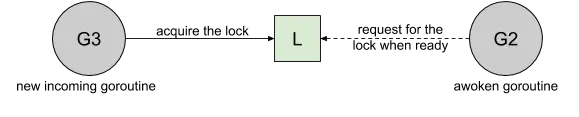
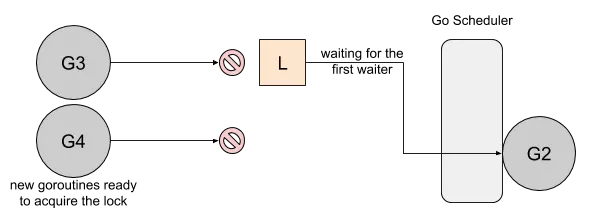
Handoff
當鎖釋放時候,鎖會一直持有直到第一個等待者準備好獲取鎖。
它降低了吞吐量,因為鎖被持有,即使另一個 goroutine 準備獲取它。
一個互斥鎖的 handsoff 會完美地平衡兩個 goroutine 之間的鎖分配,
但是會降低性能,因為它會迫使第一個 goroutine 等待鎖。
Spinning
自旋在等待隊列為空或者應用程序重度使用鎖時效果不錯。
Parking 和 Unparking goroutines 有不低的性能成本開銷,相比自旋來說要慢得多
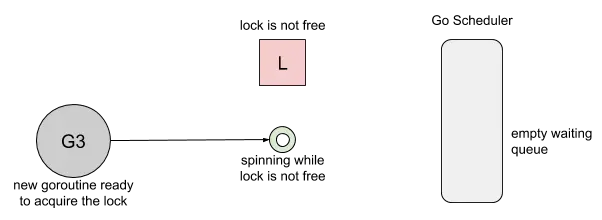
Go 1.8 使用了 Barging 和 Spining 的結合實現。 當試圖獲取已經被持有的鎖時,如果本地隊列為空並且 P 的數量大於1, goroutine 將自旋幾次(用一個 P 旋轉會阻塞程序)。 自旋後,goroutine park。 在程序高頻使用鎖的情況下,它充當了一個快速路徑。
Go 1.9 通過添加一個新的飢餓模式來解決先前解釋的問題,
該模式將會在釋放時候觸發 handsoff。
所有等待鎖超過一毫秒的 goroutine(也稱為有界等待)將被診斷為飢餓。
當被標記為飢餓狀態時,unlock 方法會 handsoff 把鎖直接扔給第一個等待者。
在飢餓模式下,自旋也被停用,因為傳入的goroutines 將沒有機會獲取為下一個等待者保留的鎖。
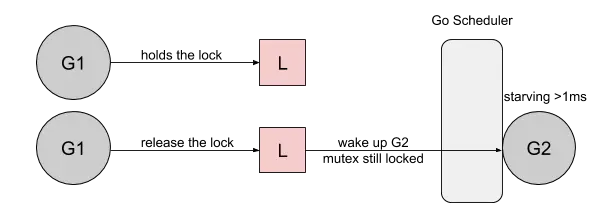
讓我們使用Go 1.9和新的starvation模式運行前面的示例:
Lock acquired per goroutine:
g1: 57
g2: 10
現在的結果更加公平。現在,我們想知道新的控制層是否會對互斥體不處於飢餓狀態的其他情況產生影響。 正如我們在該程序包的基準測試(Go 1.8與Go 1.9)中所看到的,在其他情況下,性能並沒有下降 (不同處理器數量下,性能會略有變化): https://links.jianshu.com/go?to=https%3A%2F%2Fgo-review.googlesource.com%2Fc%2Fgo%2F%2B%2F34310
sync: make Mutex more fair

Add new starvation mode for Mutex.
In starvation mode ownership is directly handed off from
unlocking goroutine to the next waiter. New arriving goroutines
don't compete for ownership.
Unfair wait time is now limited to 1ms.
Also fix a long standing bug that goroutines were requeued
at the tail of the wait queue. That lead to even more unfair
acquisition times with multiple waiters.

Performance of normal mode is not considerably affected.

Fixes #13086

On the provided in the issue lockskew program:

done in 1.207853ms
done in 1.177451ms
done in 1.184168ms
done in 1.198633ms
done in 1.185797ms
done in 1.182502ms
done in 1.316485ms
done in 1.211611ms
done in 1.182418ms

name                    old time/op  new time/op   delta
MutexUncontended-48     0.65ns ± 0%   0.65ns ± 1%     ~           (p=0.087 n=10+10)
Mutex-48                 112ns ± 1%    114ns ± 1%   +1.69%        (p=0.000 n=10+10)
MutexSlack-48            113ns ± 0%     87ns ± 1%  -22.65%         (p=0.000 n=8+10)
MutexWork-48             149ns ± 0%    145ns ± 0%   -2.48%         (p=0.000 n=9+10)
MutexWorkSlack-48        149ns ± 0%    122ns ± 3%  -18.26%         (p=0.000 n=6+10)
MutexNoSpin-48           103ns ± 4%    105ns ± 3%     ~           (p=0.089 n=10+10)
MutexSpin-48             490ns ± 4%    515ns ± 6%   +5.08%        (p=0.006 n=10+10)
Cond32-48               13.4µs ± 6%   13.1µs ± 5%   -2.75%        (p=0.023 n=10+10)
RWMutexWrite100-48      53.2ns ± 3%   41.2ns ± 3%  -22.57%        (p=0.000 n=10+10)
RWMutexWrite10-48       45.9ns ± 2%   43.9ns ± 2%   -4.38%        (p=0.000 n=10+10)
RWMutexWorkWrite100-48   122ns ± 2%    134ns ± 1%   +9.92%        (p=0.000 n=10+10)
RWMutexWorkWrite10-48    206ns ± 1%    188ns ± 1%   -8.52%         (p=0.000 n=8+10)
Cond32-24               12.1µs ± 3%   12.4µs ± 3%   +1.98%         (p=0.043 n=10+9)
MutexUncontended-24     0.74ns ± 1%   0.75ns ± 1%     ~           (p=0.650 n=10+10)
Mutex-24                 122ns ± 2%    124ns ± 1%   +1.31%        (p=0.007 n=10+10)
MutexSlack-24           96.9ns ± 2%  102.8ns ± 2%   +6.11%        (p=0.000 n=10+10)
MutexWork-24             146ns ± 1%    135ns ± 2%   -7.70%         (p=0.000 n=10+9)
MutexWorkSlack-24        135ns ± 1%    128ns ± 2%   -5.01%         (p=0.000 n=10+9)
MutexNoSpin-24           114ns ± 3%    110ns ± 4%   -3.84%        (p=0.000 n=10+10)
MutexSpin-24             482ns ± 4%    475ns ± 8%     ~           (p=0.286 n=10+10)
RWMutexWrite100-24      43.0ns ± 3%   43.1ns ± 2%     ~           (p=0.956 n=10+10)
RWMutexWrite10-24       43.4ns ± 1%   43.2ns ± 1%     ~            (p=0.085 n=10+9)
RWMutexWorkWrite100-24   130ns ± 3%    131ns ± 3%     ~           (p=0.747 n=10+10)
RWMutexWorkWrite10-24    191ns ± 1%    192ns ± 1%     ~           (p=0.210 n=10+10)
Cond32-12               11.5µs ± 2%   11.7µs ± 2%   +1.98%        (p=0.002 n=10+10)
MutexUncontended-12     1.48ns ± 0%   1.50ns ± 1%   +1.08%        (p=0.004 n=10+10)
Mutex-12                 141ns ± 1%    143ns ± 1%   +1.63%        (p=0.000 n=10+10)
MutexSlack-12            121ns ± 0%    119ns ± 0%   -1.65%          (p=0.001 n=8+9)
MutexWork-12             141ns ± 2%    150ns ± 3%   +6.36%         (p=0.000 n=9+10)
MutexWorkSlack-12        131ns ± 0%    138ns ± 0%   +5.73%         (p=0.000 n=9+10)
MutexNoSpin-12          87.0ns ± 1%   83.7ns ± 1%   -3.80%        (p=0.000 n=10+10)
MutexSpin-12             364ns ± 1%    377ns ± 1%   +3.77%        (p=0.000 n=10+10)
RWMutexWrite100-12      42.8ns ± 1%   43.9ns ± 1%   +2.41%         (p=0.000 n=8+10)
RWMutexWrite10-12       39.8ns ± 4%   39.3ns ± 1%     ~            (p=0.433 n=10+9)
RWMutexWorkWrite100-12   131ns ± 1%    131ns ± 0%     ~            (p=0.591 n=10+9)
RWMutexWorkWrite10-12    173ns ± 1%    174ns ± 0%     ~            (p=0.059 n=10+8)
Cond32-6                10.9µs ± 2%   10.9µs ± 2%     ~           (p=0.739 n=10+10)
MutexUncontended-6      2.97ns ± 0%   2.97ns ± 0%     ~     (all samples are equal)
Mutex-6                  122ns ± 6%    122ns ± 2%     ~           (p=0.668 n=10+10)
MutexSlack-6             149ns ± 3%    142ns ± 3%   -4.63%        (p=0.000 n=10+10)
MutexWork-6              136ns ± 3%    140ns ± 5%     ~           (p=0.077 n=10+10)
MutexWorkSlack-6         152ns ± 0%    138ns ± 2%   -9.21%         (p=0.000 n=6+10)
MutexNoSpin-6            150ns ± 1%    152ns ± 0%   +1.50%         (p=0.000 n=8+10)
MutexSpin-6              726ns ± 0%    730ns ± 1%     ~           (p=0.069 n=10+10)
RWMutexWrite100-6       40.6ns ± 1%   40.9ns ± 1%   +0.91%         (p=0.001 n=8+10)
RWMutexWrite10-6        37.1ns ± 0%   37.0ns ± 1%     ~            (p=0.386 n=9+10)
RWMutexWorkWrite100-6    133ns ± 1%    134ns ± 1%   +1.01%         (p=0.005 n=9+10)
RWMutexWorkWrite10-6     152ns ± 0%    152ns ± 0%     ~     (all samples are equal)
Cond32-2                7.86µs ± 2%   7.95µs ± 2%   +1.10%        (p=0.023 n=10+10)
MutexUncontended-2      8.10ns ± 0%   9.11ns ± 4%  +12.44%         (p=0.000 n=9+10)
Mutex-2                 32.9ns ± 9%   38.4ns ± 6%  +16.58%        (p=0.000 n=10+10)
MutexSlack-2            93.4ns ± 1%   98.5ns ± 2%   +5.39%         (p=0.000 n=10+9)
MutexWork-2             40.8ns ± 3%   43.8ns ± 7%   +7.38%         (p=0.000 n=10+9)
MutexWorkSlack-2        98.6ns ± 5%  108.2ns ± 2%   +9.80%         (p=0.000 n=10+8)
MutexNoSpin-2            399ns ± 1%    398ns ± 2%     ~             (p=0.463 n=8+9)
MutexSpin-2             1.99µs ± 3%   1.97µs ± 1%   -0.81%          (p=0.003 n=9+8)
RWMutexWrite100-2       37.6ns ± 5%   46.0ns ± 4%  +22.17%         (p=0.000 n=10+8)
RWMutexWrite10-2        50.1ns ± 6%   36.8ns ±12%  -26.46%         (p=0.000 n=9+10)
RWMutexWorkWrite100-2    136ns ± 0%    134ns ± 2%   -1.80%          (p=0.001 n=7+9)
RWMutexWorkWrite10-2     140ns ± 1%    138ns ± 1%   -1.50%        (p=0.000 n=10+10)
Cond32                  5.93µs ± 1%   5.91µs ± 0%     ~            (p=0.411 n=9+10)
MutexUncontended        15.9ns ± 0%   15.8ns ± 0%   -0.63%          (p=0.000 n=8+8)
Mutex                   15.9ns ± 0%   15.8ns ± 0%   -0.44%        (p=0.003 n=10+10)
MutexSlack              26.9ns ± 3%   26.7ns ± 2%     ~           (p=0.084 n=10+10)
MutexWork               47.8ns ± 0%   47.9ns ± 0%   +0.21%          (p=0.014 n=9+8)
MutexWorkSlack          54.9ns ± 3%   54.5ns ± 3%     ~           (p=0.254 n=10+10)
MutexNoSpin              786ns ± 2%    765ns ± 1%   -2.66%        (p=0.000 n=10+10)
MutexSpin               3.87µs ± 1%   3.83µs ± 0%   -0.85%          (p=0.005 n=9+8)
RWMutexWrite100         21.2ns ± 2%   21.0ns ± 1%   -0.88%         (p=0.018 n=10+9)
RWMutexWrite10          22.6ns ± 1%   22.6ns ± 0%     ~             (p=0.471 n=9+9)
RWMutexWorkWrite100      132ns ± 0%    132ns ± 0%     ~     (all samples are equal)
RWMutexWorkWrite10       124ns ± 0%    123ns ± 0%     ~           (p=0.656 n=10+10)

Change-Id: I66412a3a0980df1233ad7a5a0cd9723b4274528b
Reviewed-on: https://go-review.googlesource.com/34310
Run-TryBot: Russ Cox <rsc@golang.org>
TryBot-Result: Gobot Gobot <gobot@golang.org>
Reviewed-by: Russ Cox <rsc@golang.org>
sync.Pool
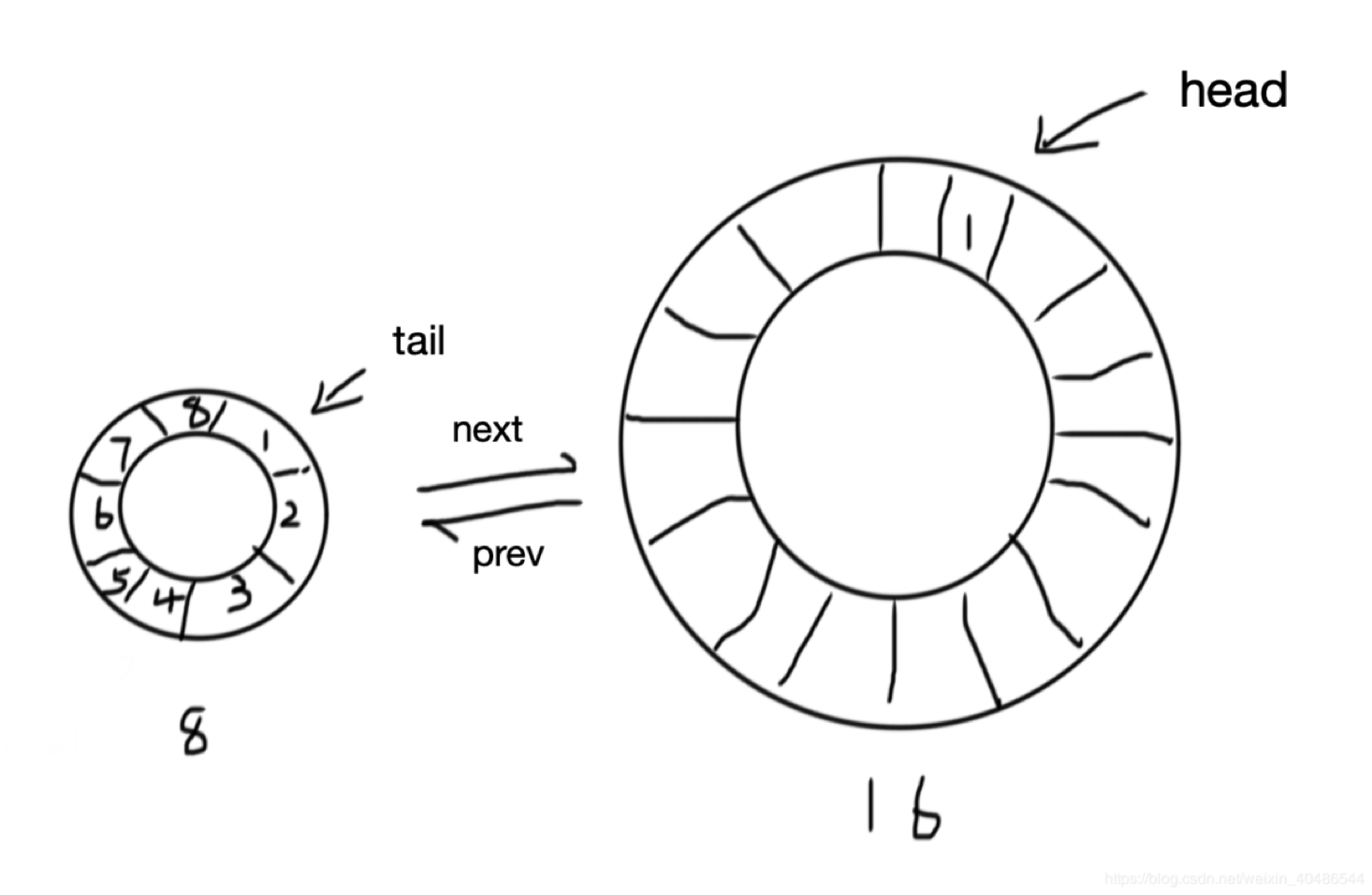
sync.Pool 的場景是用來保存和複用臨時對象,以減少內存分配,降低 GC 壓力(Request-Driven 特別合適)
type Pool struct {
    noCopy noCopy

    local     unsafe.Pointer // local fixed-size per-P pool, actual type is [P]poolLocal
    localSize uintptr        // size of the local array

    victim     unsafe.Pointer // local from previous cycle
    victimSize uintptr        // size of victims array

    // New optionally specifies a function to generate
    // a value when Get would otherwise return nil.
    // It may not be changed concurrently with calls to Get.
    New func() any
}
func (p *Pool) Put(x any) {}
func (p *Pool) Get() any {}
Get 返回 Pool 中的任意一個對象。如果 Pool 為空,
則調用 New 返回一個新創建的對象。
放進 Pool 中的對象,會在說不準什麼時候被回收掉。
所以如果事先 Put 進去 100 個對象,下次 Get 的時候發現 Pool 是空也是有可能的。
不過這個特性的一個好處就在於不用擔心 Pool 會一直增長,因為 Go 已經幫你在 Pool 中做了回收機制。
這個清理過程是在每次垃圾回收之前做的。之前每次GC 時都會清空 pool,
而在1.13版本中引入了 victim cache,會將 pool 內數據拷貝一份,避免 GC 將其清空,
即使沒有引用的內容也可以保留最多兩輪 GC
臨時對像池 sync.Pool 非常適用於在並發編程中用作臨時對象緩存,實現對象的重複使用, 優化 GC,提升系統性能,但是由於不能設置對像池大小,而且放進對像池的臨時對象每次 GC 運行時會被清除, 所以只能用作簡單的臨時對像池,不能用作持久化的長連接池,比如數據庫連接池、Redis 連接池。 連接池可以用數組或鏈結來實現. ex: Golang SQL 連接池
pprof
如果使用 benchmark的方式來評估效能, 最主要遇到的問題會是,在一大段程式碼及邏輯中,要找出慢的主因.
這時可以使用到 pprof 來找出程式碼所有執行的時間,怎麼輸出 CPU 所花的時間,可以透過底下指令:
go test -bench=. -benchtime=3s -cpuprofile cpu.out .
產生.out後可以用 go tool pprof cpu.out 來看
$ go tool pprof cpu.out
Type: cpu
Time: Aug 24, 2022 at 10:41am (CST)
Duration: 11.74s, Total samples = 32.51s (276.81%)
Entering interactive mode (type "help" for commands, "o" for options)
(pprof)
使用 top 來看數據
(pprof) top 10
Showing nodes accounting for 20040ms, 61.64% of 32510ms total
Dropped 153 nodes (cum <= 162.55ms)
Showing top 10 nodes out of 98
      flat  flat%   sum%        cum   cum%
    6370ms 19.59% 19.59%     6380ms 19.62%  runtime.madvise
    2590ms  7.97% 27.56%     9010ms 27.71%  runtime.mallocgc
    2080ms  6.40% 33.96%     2520ms  7.75%  sync/atomic.(*Value).Load (inline)
    1960ms  6.03% 39.99%     4950ms 15.23%  MyGoNote/Golang/Package_Sync/examples/atomic_mutex.Atomic.func2
    1820ms  5.60% 45.59%     1840ms  5.66%  runtime.usleep
    1660ms  5.11% 50.69%     1670ms  5.14%  runtime.pageIndexOf (inline)
    1140ms  3.51% 54.20%     1140ms  3.51%  runtime.asyncPreempt
     880ms  2.71% 56.91%      880ms  2.71%  runtime.procyield
     810ms  2.49% 59.40%     1550ms  4.77%  sync/atomic.StorePointer
     730ms  2.25% 61.64%      730ms  2.25%  runtime.memclrNoHeapPointers
(pprof) %
看atom function
(pprof) list atom
Total: 32.51s
ROUTINE ======================== MyGoNote/Golang/Package_Sync/examples/atomic_mutex.Atomic.func1 in /Users/kimi/go/src/MyGoNote/Golang/Package_Sync/examples/atomic_mutex/main.go
     450ms      9.43s (flat, cum) 29.01% of Total
         .          .     43:   v.Store(&Config{})
         .          .     44:
         .          .     45:   go func() {
         .          .     46:           i := 0
         .          .     47:           for {
      40ms       50ms     48:                   i++
     370ms      7.40s     49:                   cfg := &Config{a: []int{i, i + 1, i + 2, i + 3, i + 4, i + 5}}
      40ms      1.98s     50:                   v.Store(cfg)
         .          .     51:           }
         .          .     52:   }()
         .          .     53:
         .          .     54:   var wg sync.WaitGroup
         .          .     55:   for n := 0; n < 4; n++ {
ROUTINE ======================== MyGoNote/Golang/Package_Sync/examples/atomic_mutex.Atomic.func2 in /Users/kimi/go/src/MyGoNote/Golang/Package_Sync/examples/atomic_mutex/main.go
     1.96s      4.95s (flat, cum) 15.23% of Total
         .          .     54:   var wg sync.WaitGroup
         .          .     55:   for n := 0; n < 4; n++ {
         .          .     56:           wg.Add(1)
         .          .     57:           go func() {
         .          .     58:                   defer wg.Done()
     1.10s      1.31s     59:                   for n := 0; n < numbers; n++ {
     860ms      3.64s     60:                           cfg := v.Load().(*Config)
         .          .     61:                           cfg.T()
         .          .     62:                           // fmt.Printf("%v\n", cfg)
         .          .     63:                   }
         .          .     64:           }()
         .          .     65:   }
...
| 名稱 | 含義 |
|---|---|
| flat | 本函數的執行耗時 |
| flat% | flat 佔 CPU 總時間的比例。程序總耗時 16.22s, Eat 的 16.19s 佔了 99.82% |
| sum% | 前面每一行的 flat 佔比總和 |
| cum | 累計量。指該函數加上該函數調用的函數總耗時 |
| cum% | cum 佔 CPU 總時間的比例 |
pprof web 方式來進行 UI 操作
首先要先安裝 graphviz https://graphviz.gitlab.io/download/
MAC
brew install graphviz
接下來輸入 go tool pprof -http=:8080 cpu.out
此時你就可以在你的瀏覽器上面 http://localhost:8080/ui/
看到

net/http/pprof
如果線上遇到 CPU 或內存佔用過高,該怎麼辦呢?總不能將上面的 Profile 代碼編譯到生產環境吧,這無疑會極大地影響性能。
net/http/pprof提供了一個方法,不使用時不會造成任何影響,遇到問題時可以開啟 profiling 幫助我們排查問題。
我們只需要使用import這個包,然後在一個新的 goroutine 中調用http.ListenAndServe()在某個端口啟動一個默認的 HTTP 服務器即可:
package main

import (
  ...
    _ "net/http/pprof"
)


func main() {
    ...
    log.Fatalln(http.ListenAndServe("localhost:9999", nil))
}
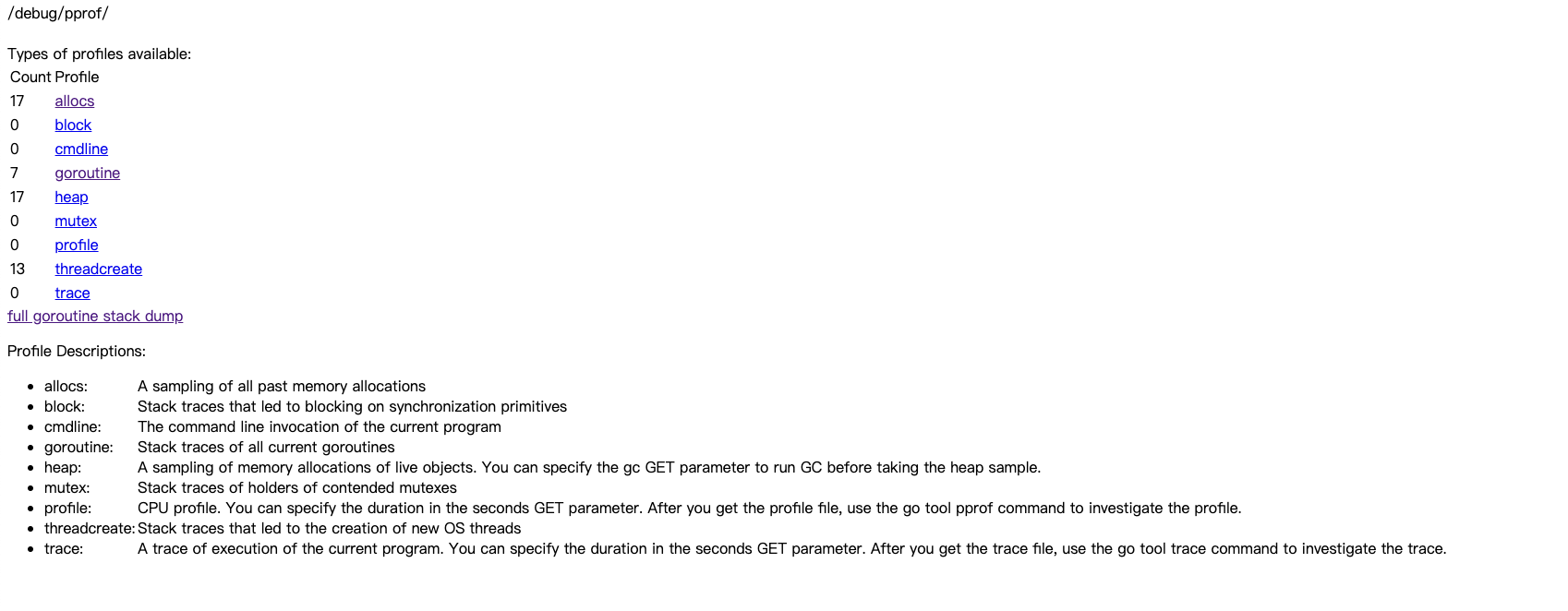
打開瀏覽器 http://localhost:9999/debug/pprof/
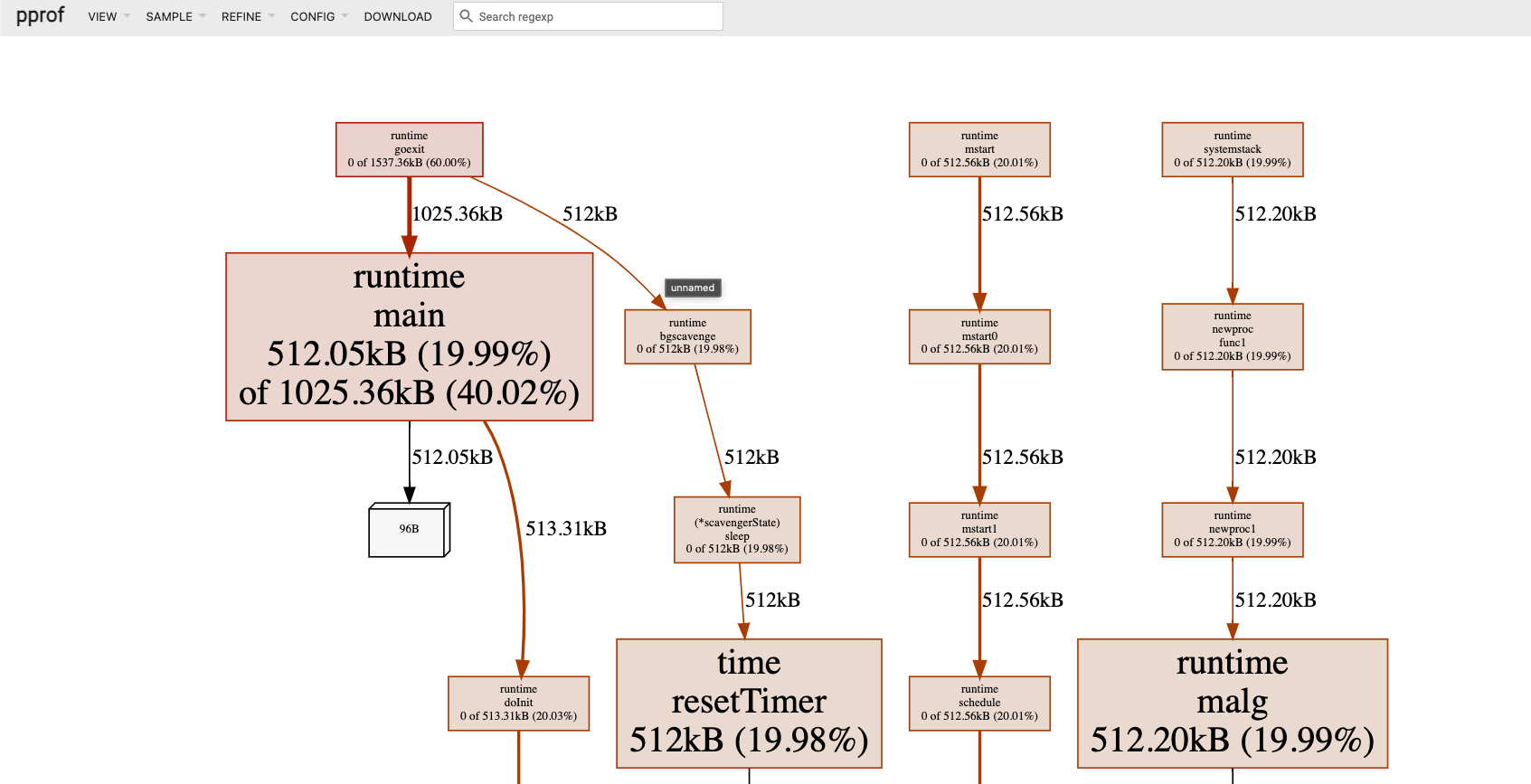
也支援遠程調用
go tool pprof -http :8080 http://localhost:9999/debug/pprof/allocs\?debug\=1
打開瀏覽器 http://localhost:8080/ui
errgroup
more example : https://pkg.go.dev/golang.org/x/sync/errgroup
一般在使用 goroutine 的時候都不能夠 return value, 如果要將 goroutine 執行後的結果傳出去的話, 通常就要新增一個 channel 將結果傳送進去 而 errgroup 這套件適用於, 如果你開的 goroutine 執行的時候如果遇到 error 就停止工作, 並且需要知道 error value 的情況.
核心原理: 利用 sync.Waigroup 管理並行執行的 goroutine.
- 並行工作流
- 錯誤處理 或 優雅降級
- context 傳播和取消
- 利用局部變量+閉包
justErrors.go
package main

import (
    "fmt"
    "net/http"

    "golang.org/x/sync/errgroup"
)

func main() {
    g := new(errgroup.Group)
    var urls = []string{
        "http://www.golang.org/",
        "http://www.google.com/",
        "http://www.somestupidname.com2/",
    }
    for _, url := range urls {
        // Launch a goroutine to fetch the URL.
        url := url // https://golang.org/doc/faq#closures_and_goroutines
        g.Go(func() error {
            // Fetch the URL.
            resp, err := http.Get(url)
            if err == nil {
                resp.Body.Close()
            }
            return err
        })
    }
    // Wait for all HTTP fetches to complete.
    if err := g.Wait(); err == nil {
        fmt.Println("Successfully fetched all URLs.")
    } else {
        fmt.Println("Fail : ", err)
    }
}
// Fail :  Get "http://www.somestupidname.com2/": dial tcp: lookup www.somestupidname.com2: no such host
- 首先
new(errgroup.Group)建立一個 group struct,這個 struct 本身沒有 field 需要設值,所以單純建立 empty struct 就可以了. - group struct 本身有提供function,分別是
Go,Wait,TryGo,SetLimit,Wait跟sync.waitGroup相似.Gofunction 接受的參數是一個 function 並且 return error, 用來放進行你想要執行的 goroutine 的 function, 最後呼叫Wait, 代表會開始 block, 很像 waitGroup Wait 的做法, 會等待你所開啟的 goroutine 執行完畢才會跳脫 Wait. 而還有一個差別是 Wait 會回傳 error, 這個 error 來自於你其中一個 goroutine 所回傳的 error.
其實 errGroup 只會存放一個 goroutine 的 error, 至於會存放誰的? 就看誰最先遇到 error 就會存進去, 後續 goroutine 如果遇到 error, 其 error 就不會存起來.
errGroup 預設不會取消其他 goroutine 的運作
errGroup 在運作的時候即便你其中一個 goroutine 遇到錯誤了, 也是不會 cancel 其他 goroutine, 那這樣就無法及時 cancel 其他 goroutine, 也無法知道 goroutine 是否有正確退出. errGroup 有想到這樣的情況, 所以它選擇用 context 的做法來結束其他 goroutine
pipeline.go
package main

import (
    "context"
    "crypto/md5"
    "fmt"
    "io/ioutil"
    "log"
    "os"
    "path/filepath"

    "golang.org/x/sync/errgroup"
)

// Pipeline demonstrates the use of a Group to implement a multi-stage
// pipeline: a version of the MD5All function with bounded parallelism from
// https://blog.golang.org/pipelines.
func main() {
    m, err := MD5All(context.Background(), ".")
    if err != nil {
        log.Fatal(err)
    }

    for k, sum := range m {
        fmt.Printf("%s:\t%x\n", k, sum)
    }
}

type result struct {
    path string
    sum  [md5.Size]byte
}

// MD5All reads all the files in the file tree rooted at root and returns a map
// from file path to the MD5 sum of the file's contents. If the directory walk
// fails or any read operation fails, MD5All returns an error.
func MD5All(ctx context.Context, root string) (map[string][md5.Size]byte, error) {
    // ctx is canceled when g.Wait() returns. When this version of MD5All returns
    // - even in case of error! - we know that all of the goroutines have finished
    // and the memory they were using can be garbage-collected.
    g, ctx := errgroup.WithContext(ctx)
    paths := make(chan string)

    g.Go(func() error {
        defer close(paths)
        return filepath.Walk(root, func(path string, info os.FileInfo, err error) error {
            if err != nil {
                return err
            }
            if !info.Mode().IsRegular() {
                return nil
            }
            select {
            case paths <- path:
            case <-ctx.Done():
                return ctx.Err()
            }
            return nil
        })
    })

    // Start a fixed number of goroutines to read and digest files.
    c := make(chan result)
    const numDigesters = 20
    for i := 0; i < numDigesters; i++ {
        g.Go(func() error {
            for path := range paths {
                data, err := ioutil.ReadFile(path)
                if err != nil {
                    return err
                }
                select {
                case c <- result{path, md5.Sum(data)}:
                case <-ctx.Done():
                    return ctx.Err()
                }
            }
            return nil
        })
    }
    go func() {
        g.Wait()
        close(c)
    }()

    m := make(map[string][md5.Size]byte)
    for r := range c {
        m[r.path] = r.sum
    }
    // Check whether any of the goroutines failed. Since g is accumulating the
    // errors, we don't need to send them (or check for them) in the individual
    // results sent on the channel.
    if err := g.Wait(); err != nil {
        return nil, err
    }
    return m, nil
}
- errgroup 提供 WithContext 放入你的 parent context, 並且 return group struct 及 context, 這個 context 事實上是一個 cancel context
// WithContext returns a new Group and an associated Context derived from ctx.
//
// The derived Context is canceled the first time a function passed to Go
// returns a non-nil error or the first time Wait returns, whichever occurs
// first.
func WithContext(ctx context.Context) (*Group, context.Context) {
    ctx, cancel := context.WithCancel(ctx)
    return &Group{cancel: cancel}, ctx
}
- 拿到 cancel context 後就可以放在 Go function 裡面去 select <- ctx.Done () 來得知是否要被 cancel, 藉此結束 goroutine.
Reference
- https://github.com/pkg/profile
- https://github.com/darjun/you-dont-know-go
- https://darjun.github.io/2021/06/09/youdontknowgo/pprof/
- https://blog.wu-boy.com/2020/06/golang-benchmark-pprof/
- https://blog.csdn.net/weixin_42654444/article/details/82108055
- https://medium.com/a-journey-with-go/go-mutex-and-starvation-3f4f4e75ad50
- Golang - errGroup 用法及適用情境
- Kratos 源码分析:Errgroup 机制